


Bobby Approved
4.82.61K Reviews
App Specs
- Version
- 1.3.3
- Updated On
- License
- Free
- Downloads
- 1,000,000+
- Developer
- BA GLOBAL HOLDINGS, LLC
- Categories
- Food & Drink
- Platform
- Android, iOS
Screenshots
 Analysis by AppCompare
So, I’ve been diving into this app called Bobby Approved, and let me tell you, it’s quite a ride. If you’re someone who’s constantly second-guessing your grocery choices or just want a simple way to know what’s good for you, this might just be your new best friend. Let’s break it down.
The first few grocery trips are where the idea feels most useful: a product that looks healthy can still leave you unsure when you turn over the package and face a long ingredient list. I like having a way to pause and check rather than relying only on front-of-box claims. The useful habit is not scanning everything in sight; it is checking the foods you buy repeatedly, then deciding whether the result changes what goes into your basket.
When a quick check earns its place
A realistic use is standing in the aisle with two similar snacks in hand. I can scan one, look at the app’s assessment, and then check the other rather than guessing from packaging language alone. That comparison is more practical than treating one scan as a complete verdict on my diet. It also helps when I’m choosing an unfamiliar pantry item and want a prompt to examine what is actually in it.
For families, the same routine can make shopping less abstract. A parent could check a snack the children already ask for, then use the result to talk through an alternative without turning the trip into a lecture. I would still make the final choice based on the child’s needs, the full label, and what the family can realistically buy and eat. The app is a decision aid, not a substitute for personal judgement.
What’s the Deal with Bobby Approved?
Alright, picture this: you’re standing in the grocery aisle, overwhelmed by the sea of products, each claiming to be the healthiest or most organic choice. Enter Bobby Approved. This app is like having a nutritionist in your pocket. It’s designed to help you make informed decisions about what you’re buying and consuming.
That framing works best if you think of the app as a shopping companion rather than a medical authority. Food choices depend on context: an ingredient someone prefers to avoid may be perfectly acceptable to another person, and a favourable scan cannot account for every aspect of a meal or someone’s health. I find the scan most valuable as a reason to look closer, not as a command to buy or reject something automatically.
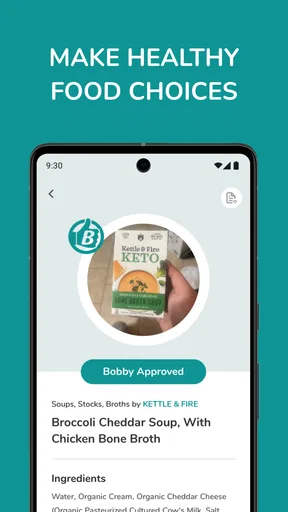
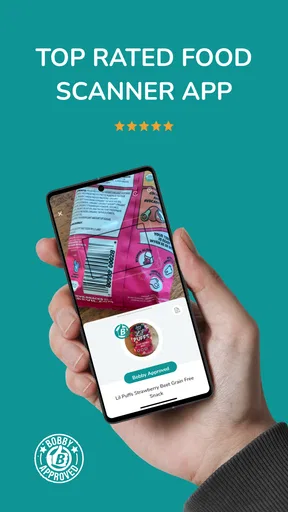
With a simple scan of a product’s barcode, the app provides a detailed analysis of its ingredients and nutritional value. It’s like having a buddy who’s a stickler for clean eating, giving you the thumbs up or down based on the product’s quality.
Worth Reading Before You Choose

EA SPORTS FC Mobile 26 Is a Bigger Football Game, but It Takes Time

Flipboard Shows What News Apps Must Do Beyond the Feed

Switching to Android Auto Means Rethinking Your Driving Routine

Google Calendar Makes a Crowded Week Easier to Manage

Ludo King Makes the Most of the Minutes Between Plans

Baby Panda World Brings Quick Play to Modern Phones, but Its Game Library Feels Busy
For people who like to research, the scan can be a starting point: check the product, read the ingredient panel yourself, and decide whether the app’s judgement matches your own priorities. If you are comparing products, scan them under the same conditions and pay attention to the actual package in your hand. Labels and product formulations can change, so I would not treat an old impression as a permanent guarantee about a food.
Features That Stand Out
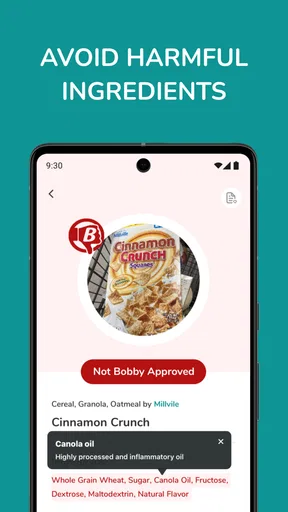
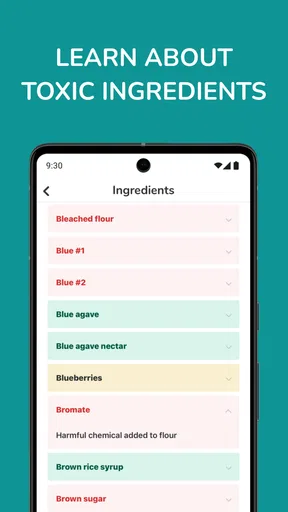
One of the standout features is the ingredient scanner. You just point your phone at a product, and it’s almost like magic—boom, you’ve got a rundown of everything in it. The app highlights any ingredients that might not meet your standards or diet preferences, which is super handy for anyone with dietary restrictions or allergies.
There is an important distinction for allergy-conscious shoppers: an app-based assessment should not replace reading the package for allergen statements or checking with a qualified professional about a serious allergy. I would use the scan to flag something worth investigating, then verify the exact item and its current label. That extra step is especially sensible with packaged foods that have several versions or flavours, where a result for one product may not settle the question for another.
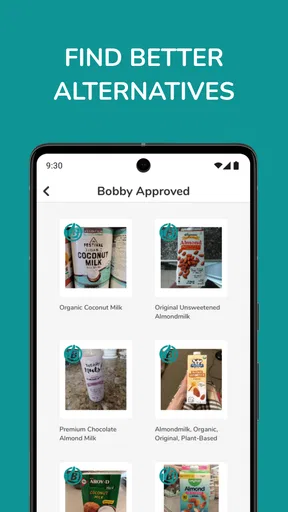
Another neat feature is the personalized recommendations. Based on your preferences, the app suggests alternatives that might be a better fit. It’s like having your own personal shopper who knows exactly what you like and what you’re trying to avoid.
Recommendations are most useful when I treat them as a shortlist rather than a shopping order. A suggested replacement still needs to suit my taste, budget, cooking plans, and household routine. One practical trick is to check a familiar product before looking for an alternative: that gives me a personal reference point, so I can judge whether the suggestion addresses something I actually care about instead of chasing a theoretical ideal.
Using the App: A Personal Experience
Now, using Bobby Approved is pretty straightforward. The interface is clean and user-friendly, which is a big win in my book. No one has time to deal with complicated menus when you’re just trying to find out if that granola bar is actually good for you.
I took it for a spin during my last grocery run. I scanned a few items I usually buy, and it was enlightening, to say the least. Some of my go-to snacks didn’t quite pass the test, and Bobby was quick to point out healthier alternatives. It’s definitely changed how I shop.
That first-week surprise is real, but I would avoid turning a shopping trip into a contest to scan the most items. A more useful routine is to check a few regular purchases, note which results genuinely affect my choices, and leave the rest alone. On a rushed trip, I would prioritize the products I am uncertain about rather than holding up the shop to inspect every item. That keeps the tool helpful instead of making food shopping feel like homework.
Month-to-month value and the upkeep it asks of you
Over time, the app earns a place on my phone only if I keep using it for decisions that recur. A one-off scan can be interesting, but the stronger case is checking a snack or pantry staple when I am restocking and then applying what I learned next time. That turns the app from a novelty into a small shopping habit. If the results do not change my decisions, there is little reason to open it on every trip.
The maintenance burden is mostly attention. I have to remember to bring out my phone, frame the barcode, and consider whether the result applies to the exact product I am holding. For a short list of regular foods, that is manageable. For someone who wants instant answers without pausing, or who shops in a hurry with children or a full trolley, the extra step can become irritating. I would use it selectively rather than make scanning a rule.
It also helps to keep personal standards clear. Before shopping, I can decide whether I am focusing on particular ingredients, general product quality, or simply exploring alternatives. Without that boundary, every result risks becoming another reason to second-guess the basket. Bobby Approved can guide attention, but I still need to choose what matters to me and make room for convenience, enjoyment, and the food I will actually eat.
Where it differs from other ways of choosing food
The usual alternative is reading the package, comparing products manually, or searching for information elsewhere. Those approaches can give me more direct control over what I consider important, but they ask me to interpret the label and remember what I have learned. A quick scan is easier when I want a first-pass assessment in the aisle. The trade-off is that a simple judgement can flatten a decision that depends on my own diet, the exact product, and how I plan to use it.
I would not use it as a replacement for a dietitian’s advice, a medically required food plan, or careful label checking for allergies. Nor is it the best fit for someone who is already comfortable comparing ingredients and prefers to make every decision independently. It makes more sense for curious shoppers, people trying to build a more deliberate routine, and households that want a convenient prompt while choosing packaged foods.
Who’s This App For?
Honestly, I’d say Bobby Approved is for anyone who wants to be more conscious about their food choices. Whether you’re a health enthusiast, someone with specific dietary needs, or just curious about what’s in your food, this app has something for you.
Parents might also find it particularly useful. It’s a great tool for making sure the snacks you’re buying for the little ones are up to par. Plus, it’s a fun way to get kids involved in choosing healthier options.
It is less suited to someone who dislikes food scoring altogether, wants a guarantee that a product is right for a particular medical condition, or expects every item to be judged in a way that matches their personal priorities. In those cases, package labels, professional guidance, or a familiar manual comparison may be better. I would also keep the scan in perspective: a single packaged food is only one part of what I eat, and a shopping tool cannot make the whole diet balanced by itself.
Keeping the habit useful instead of tiring
The main source of fatigue is not the scanning itself; it is letting each result expand into an all-or-nothing judgement. If every snack becomes a test of whether I am shopping perfectly, I will likely stop opening the app. I get more lasting value by using it when I have a real question, saving the learning for repeat purchases, and accepting that not every choice needs an investigation.
Another sensible boundary is to avoid treating recommendations as a demand to replace foods I enjoy. If an alternative sounds unappealing or does not fit the meal I am planning, the suggestion has not solved my actual problem. I would rather use the app to understand a choice and then make a realistic decision than follow a result that makes my routine harder to maintain.
BA GLOBAL HOLDINGS, LLC is the developer behind this free Food & Drink app. It has an average rating of 4.8 from around 18,000 ratings, with roughly 2,500 written reviews and over one million installs. The age rating is Everyone, and version 1.3.3 runs on Android 7.0 and later. Those details make it accessible to many Android users, though my recommendation still depends on whether a scan-based approach suits how you shop.
Final Thoughts
Overall, Bobby Approved is a game-changer for anyone looking to declutter their diet and make informed choices. It’s like having that super knowledgeable friend who always knows what’s good for you. If you’re ready to take control of your grocery shopping and eat cleaner, giving this app a shot might just be the best decision you make.
So, next time you’re at the store, whip out Bobby Approved and start scanning. You might be surprised at what you find!
My longer-term verdict is a little more measured: I think it can become a useful companion if it helps you make a few repeat decisions with more confidence. The first scans may be eye-opening, but lasting value comes from using it selectively and keeping your own needs in charge. If you want a fast prompt to inspect packaged foods, it is worth trying; if you want definitive medical guidance or dislike app-based food judgements, another approach will serve you better.
Pros
- Intuitive and user-friendly interface.
- Comprehensive food database.
- Barcode scanner for quick info.
- Customizable dietary preferences.
- Regular updates with new features.
Cons
- Limited offline functionality.
- Occasional database inaccuracies.
- Ads in the free version.
- No meal planning feature.
- Requires account for full access.
FAQs for Bobby Approved
What is Bobby Approved, and how does it work?
Bobby Approved is a mobile app designed to help users make informed dietary choices. It scans food labels to provide insights into ingredients, nutritional information, and potential allergens. Users can simply use their device's camera to scan a product's barcode, and the app will display detailed information to help them decide if the product fits their dietary needs.
Is Bobby Approved available for both Android and iOS?
Yes, Bobby Approved is available for download on both Android and iOS platforms. Users can find the app on the Google Play Store for Android devices and the Apple App Store for iOS devices. Ensure your device meets the minimum system requirements for a smooth experience.
Does Bobby Approved require an internet connection to function?
Bobby Approved requires an internet connection to access its extensive database and provide real-time information about products. While scanning and basic functions may work offline, an internet connection ensures you receive the most up-to-date and accurate data for your dietary needs.
Are there any subscription fees or in-app purchases in Bobby Approved?
Bobby Approved offers a free version with basic features that cater to most users. However, for enhanced features such as advanced nutritional insights and personalized recommendations, a subscription fee may apply. Users can choose to upgrade within the app for a more comprehensive experience.
How accurate is the information provided by Bobby Approved?
Bobby Approved strives to deliver accurate and reliable information by continuously updating its database with the latest product details. However, it's always a good practice to double-check labels directly, especially if you have specific dietary restrictions or allergies, to ensure the information meets your personal requirements.


